
On this page
The spreadsheet with laptops, monitors and serial numbers did the job for a long time. Until remote work, the third hiring wave and the first departure where nobody knew which headset was supposed to come back. If you then search for IT asset management software, you quickly end up with tools built for data centers full of server racks.
This comparison is deliberately short: five tools that are actually searched for and used in Germany, with honest strengths, limits and prices. By the end, you'll know which one fits your situation.
Key points
- For cloud-first teams with laptops and lots of SaaS tools, Sovaro is the best fit because it combines inventory, its own MDM and software in one tool. On- and offboarding and spend matching are available as add-ons, with or without an IT admin.
- Snipe-IT is the free open source classic for plain asset tracking, but it has no agent of its own and no MDM.
- GLPI is also open source and combines inventory with a full ticketing system, but it is considerably more complex.
- For servers, network and documentation duties on site, Docusnap and LOGINventory are the right choice, as they scan the company network without an agent.
What IT asset management software should do
IT asset management means keeping every device and every license under control across its whole lifecycle: from purchase to handover to return or retirement. Software for this has to do at least three things:
- Capture devices, ideally automatically rather than by hand.
- Assign devices to people, including accessories like monitors and headsets.
- Document changes: Who got what, and what has to come back when someone leaves?
How the tools solve this varies a lot. And that's exactly what decides which one fits you. If all you need is an up-to-date device list, our IT inventory software comparison covers more options.
Five questions before you choose
- Cloud or your own servers? Are there servers, switches and printers on your network, or do you work with laptops and cloud services from anywhere?
- Who runs the tool? Self-hosted software needs someone for servers, updates and backups.
- Do you need MDM? That is, locking and wiping devices remotely and deploying software. A plain inventory only shows what's there.
- Should software and costs be included? If you want to know which licenses are paid for but not used, you need more than a device list.
- How is it billed? Per person, per asset, per IT technician or a flat price per edition. For the same company size, that makes a big difference.
The 5 tools compared
Sovaro
Ideal for: cloud-first teams with around 30 to 150 employees (usable up to 250), with or without their own IT admin.
Sovaro is built for companies whose IT consists of laptops, Google Workspace or Microsoft 365 and lots of SaaS tools. An agent on every device, rolled out via a setup link, reports model, serial number, installed software and security status. That keeps the inventory up to date from day one, including for remote workers.
IT admins get in one place what is otherwise spread across several tools: inventory, MDM, software and, with the add-on, offboarding. And anyone who handles IT on the side still finds their way around, because the interface avoids jargon.
- Strengths: its own MDM for Mac, Windows and Linux with lock, unlock and wipe; Intune can be connected; accessories via invoice, a photo of the serial number or by hand; detection of SaaS tools in use via agent and browser extension; hosting in the EU. As add-ons: on- and offboarding with return list and tasks, triggered by Google Workspace, Microsoft Entra or Personio, plus matching invoices against actual usage.
- Limits: Sovaro doesn't manage smartphones and tablets via MDM yet, though you can record them in the inventory; no network scan for printers, switches or servers; cloud only.
- Price: €6.90 per person per month for devices and software, on- and offboarding plus €2.90, spend plus €4.90. 14-day free trial without payment details. Cancel monthly.
Snipe-IT
Ideal for: teams that want a free, flexible asset list and handle the upkeep themselves.
Snipe-IT is the best-known open source tool for IT asset management and the recommendation for smaller companies in almost every comparison. It manages devices, accessories, consumables and licenses, including checkout, check-in and digital acceptance.
- Strengths: self-hosted with no license costs; hosted version with unlimited users and assets, including a Frankfurt location; barcodes and QR labels; German interface; sync adapters pull device data from MDM systems such as Intune or Jamf.
- Limits: no agent of its own and no MDM, so without a connected MDM you maintain devices by hand or via CSV; no detection of software in use; no on- and offboarding workflows; self-hosting means looking after servers, updates and backups yourself.
- Price: free when self-hosted; hosted from $39.99 per month.
Already using Snipe-IT? Here's how switching to Sovaro works.
GLPI
Ideal for: technically experienced IT teams that prefer open source and want a ticketing system included.
GLPI shows up in every open source comparison, but it's more than IT asset management: a full service management system with tickets, problem and change management. Inventory runs via the GLPI Agent for Windows, macOS, Linux and Android.
- Strengths: self-hosted with no license costs; inventory and helpdesk in one; automatic discovery via agent; large community; cloud version from the vendor Teclib' in France.
- Limits: much more complex than plain asset management, so onboarding takes time; no MDM; single sign-on with Entra or Google via the official plugin only with GLPI Network, meaning in the cloud or with a subscription from €100 per month.
- Price: free when self-hosted; cloud from €19 per IT technician per month, unlimited end users and assets.
Docusnap
Ideal for: IT departments with grown infrastructure that have to document everything thoroughly, for example for NIS2 or ISO 27001.
Docusnap comes from Kiefersfelden in Bavaria and is more IT documentation than classic asset management. A gateway on the company network scans Windows, Linux, macOS, VMware, Hyper-V, Active Directory and network devices without an agent and turns the results into network maps, IP overviews and reports.
- Strengths: very broad coverage of classic infrastructure; automatic network maps; information security features for ISO 27001, NIS2 and BSI IT-Grundschutz; German interface; available as cloud (Docusnap365) or on-premises.
- Limits: the gateway needs a Windows machine on your own network, even in the cloud version; laptops outside the company network can only be reached with extra effort; asset and license management only in the Business edition; no MDM.
- Price: Docusnap365 Pro €199 per month, Business with asset management €699 per month, each billed annually; on-premises on request.
LOGINventory
Ideal for: IT teams with a Windows network that want a lean, local inventory without an agent.
LOGINventory comes from Schmidt's LOGIN in Munich and has been on the market since 2002. It runs locally on your own network and captures Windows, Mac and Linux machines as well as network devices via WMI, SSH and SNMP, by default without installing anything on the devices.
- Strengths: agentless inventory; automatic network topology; license reconciliation (target vs. actual) in the SAM edition; matching against known vulnerabilities via the partner service Cyber Insight (separate contract); accessories via QR code; low price per asset; free forever for up to 20 assets.
- Limits: local installation with its own database only, no cloud; remote devices only via logon script or offline agent, with data arriving once they connect to the company network or VPN; no MDM; no detection of SaaS usage.
- Price: €6.50 per asset per year (Inventory), €8.60 with software asset management, each for up to 249 assets; accessories cheaper as add-on assets.
The 5 tools at a glance
| Tool | Deployment | Discovery | MDM | Price from |
|---|---|---|---|---|
| Sovaro | Cloud | own agent, Intune | yes, Mac, Windows, Linux | €6.90 per person per month |
| Snipe-IT | self-hosted or hosted | manual, CSV, sync from MDM | no | free, hosted $39.99 per month |
| GLPI | self-hosted or cloud | GLPI Agent | no | free, cloud €19 per technician per month |
| Docusnap | cloud or on-premises, gateway on the network | agentless network scan | no | €199 per month, with asset management €699 |
| LOGINventory | on-premises | agentless network scan | no | €6.50 per asset per year |
Which tool fits you?
What matters isn't how big your IT team is, but what infrastructure you manage.
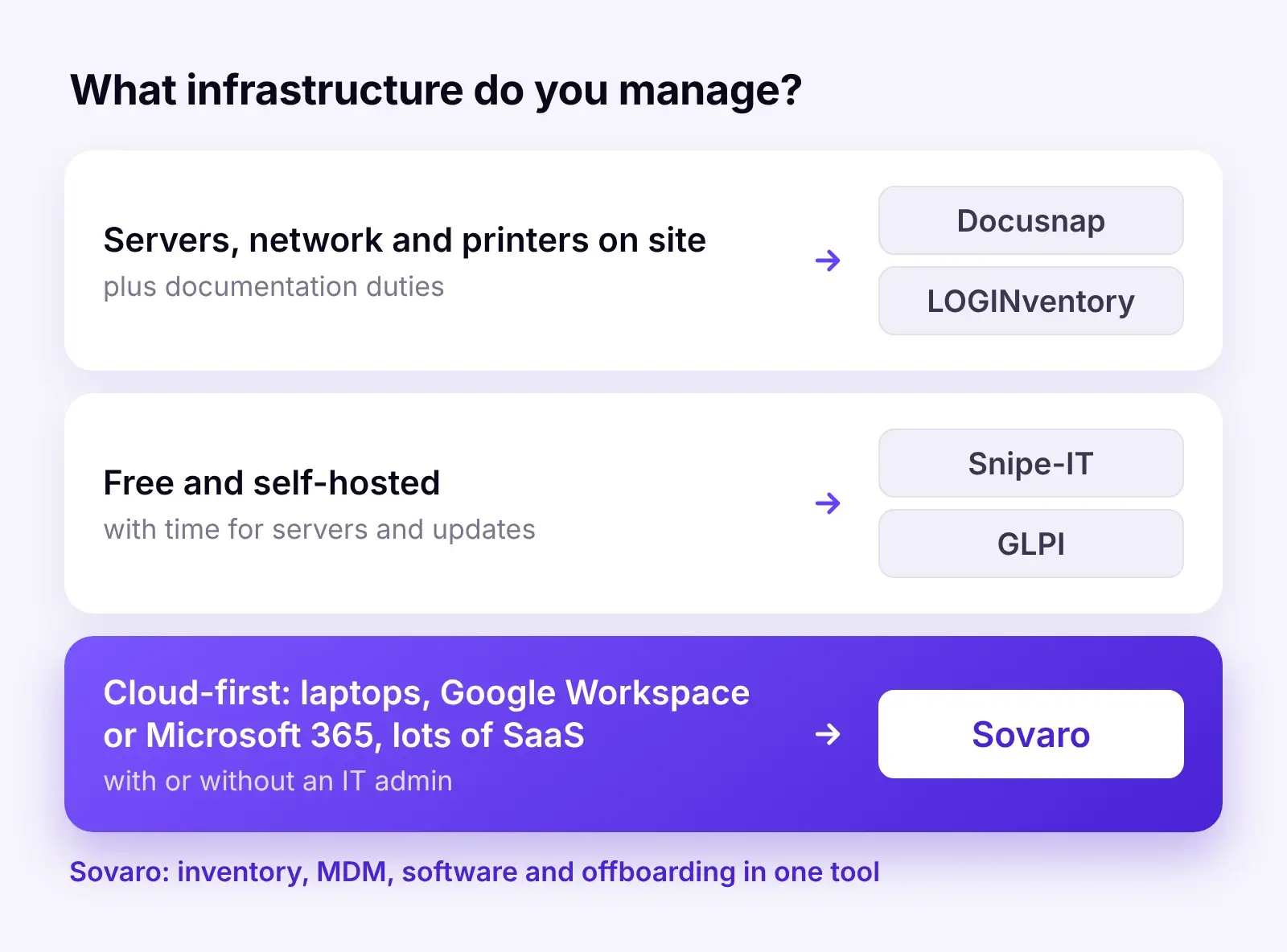
- Servers, network and printers on site, plus documentation duties: Docusnap if you need thorough documentation, LOGINventory if a lean, low-cost inventory is enough.
- Free and self-hosted, with time to run it: Snipe-IT for plain asset tracking, GLPI if you also need a ticketing system.
- Cloud-first with laptops, Google Workspace or Microsoft 365 and lots of SaaS tools: Sovaro. IT admins get inventory, MDM, software and, if needed, offboarding in one tool instead of four. Teams without an admin get a tool that someone can still run.
What does it cost for 50 employees?
An example using list prices, all excluding VAT: 50 employees with one laptop and one monitor each, so 100 assets, and one person looking after IT.
- Sovaro: €345 per month, including MDM and SaaS detection. With on- and offboarding and spend €625, because the full bundle costs €12.50 instead of €14.70 per person.
- Snipe-IT: €0 self-hosted plus the effort of running it, hosted $39.99 per month. You'll also need an MDM, such as Intune, which is included in Microsoft 365 Business Premium.
- GLPI: €0 self-hosted plus running costs, cloud €19 per month for one technician.
- Docusnap: €699 per month for the Business edition, which includes asset management.
- LOGINventory: around €325 per year for the 50 laptops, just under €490 with the monitors as add-on assets in a 100-pack, so around €40 per month, plus your own server.
For a plain inventory, Snipe-IT, GLPI and LOGINventory are cheaper than Sovaro. The difference is what comes on top: Sovaro already includes MDM and detection of software in use, with offboarding and cost matching as add-ons. With the others, you need additional tools for that, and someone has to connect them.
Conclusion
There's no single winner, but there is a clear dividing line. If you have classic infrastructure with servers and a network on site, Docusnap and LOGINventory are made for you. If you want to start for free and have time to run it, Snipe-IT and GLPI are solid open source options.
If you work cloud-first, Sovaro is the better choice. Whether an IT admin owns IT or it runs on the side: you get inventory, MDM and software in one tool, with offboarding and spend as add-ons, and no server of your own.
Try Sovaro yourself: roll out the agent, and your laptops show up on their own with software and security status. 14-day free trial without payment details, cancel monthly. Try for free
Frequently asked questions
See Sovaro with your own data.
Connect Google Workspace or Microsoft Entra and see your devices, apps, and licenses in minutes.
14-day free trial, no payment details required. Cancel monthly.