
On this page
According to the German digital association Bitkom, Germany is short of 79,000 IT specialists, and 97 percent of companies find it hard to fill IT roles. Many companies with 40, 80 or 150 employees have no IT department of their own. The work still needs doing. It ends up with office management, HR or the managing director, usually on top of their actual job.
That can work well if it is clear what belongs to IT, who takes care of it and where you bring in outside help. This guide shows how to split the work.
Key points
- Day-to-day IT comes down to five tasks. These are devices, access, software, security and help when something breaks.
- You can handle the ongoing administration yourselves if one person is in charge and all the information sits in one place.
- For network, servers and security incidents, an IT service provider is worth the money.
- A dedicated IT role pays off once the ongoing work keeps one person busy full time.
Which tasks belong to IT
Companies without an IT department often underestimate how much comes up in daily work. Almost all of it falls into one of five areas.
- Devices. Ordering laptops, setting them up, handing them out, getting them repaired and taking them back at the end.
- Access. Creating accounts for new employees, adjusting permissions and locking everything again when someone leaves.
- Software. Choosing tools, buying licenses and keeping track of what is still being used.
- Security. Updates, encryption, two-factor authentication and backups.
- Help when something breaks. The printer will not print, the Wi-Fi drops, a password is lost.
The first three areas are administration. They need order and fixed processes, but not a computer science degree. The last two need expertise as soon as things go beyond the normal case.
Who does what
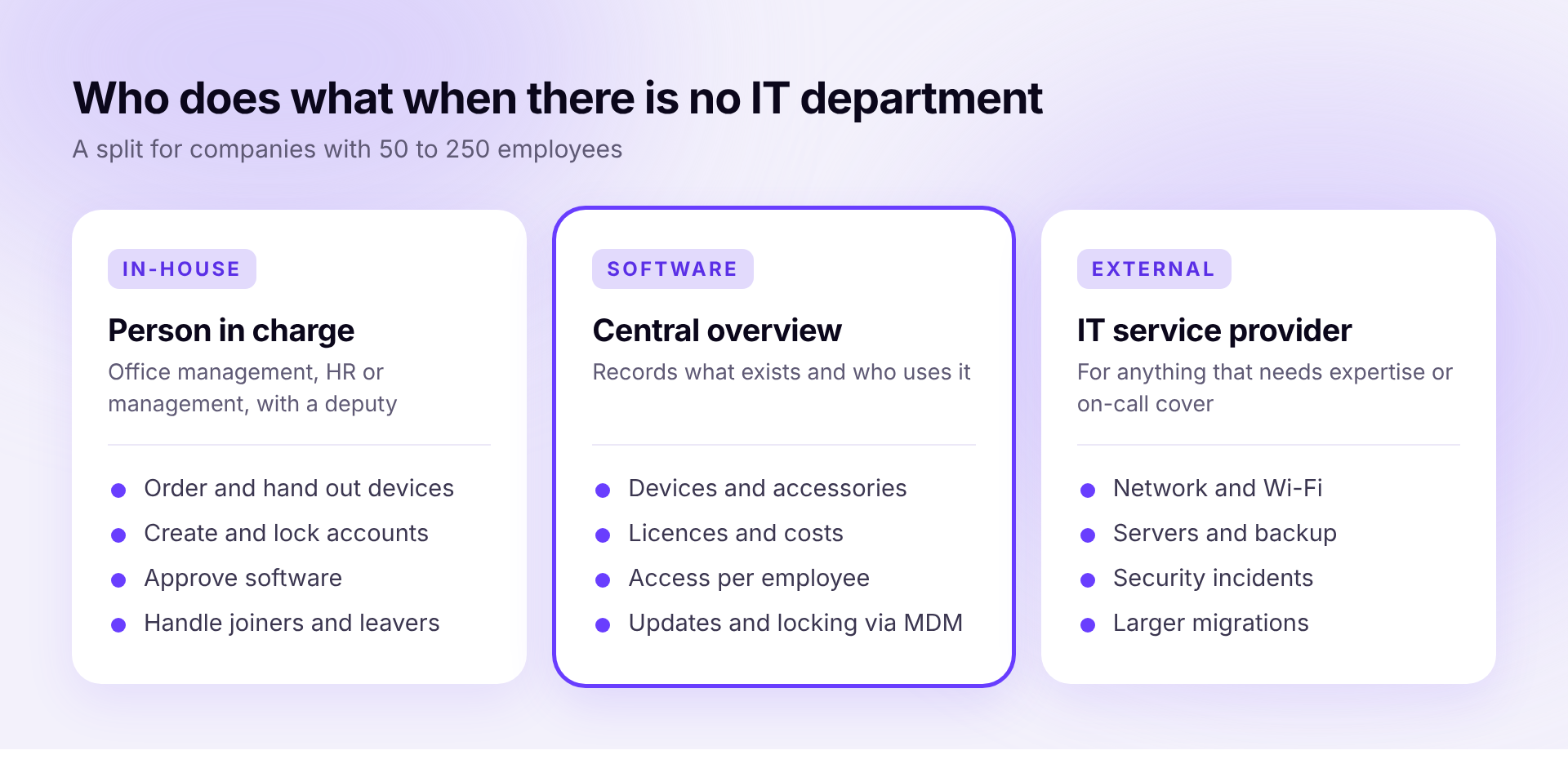
This leads to a simple split. One person in the company is in charge, one piece of software keeps the overview, and a service provider steps in when it gets technical.
Name one person
Often nobody feels responsible. Every team then orders for itself, and when someone leaves, nobody knows which accounts are still open. So name one person who handles orders, joiners and leavers, and approvals. That person needs fixed time for it every week and a deputy for holidays and sick days.
Create one place for all the information
As long as devices sit in a spreadsheet, licenses in accounting and access in people's heads, every question starts a search. Who has which laptop, what you pay for software and which accounts a colleague has who leaves at the end of the month should all be in one place. Our comparisons of IT inventory software and MDM software show which tools can do that.
A service provider for the technical side
Network, firewall, servers and backups belong in the hands of specialists. That applies even more in an emergency, such as a malware attack. In Germany, IT service providers usually charge for this as a fixed monthly price per workplace. The Hamburg-based provider hagel IT puts the usual market range at 30 to 80 euros per workplace per month, depending on scope. Before you sign, clarify exactly what is included and how fast they respond.
When a dedicated IT admin pays off
There is no fixed threshold in headcount. A company with 80 employees that works entirely with cloud software can often still manage without one. A company with 60 employees, its own servers and two sites may not. These signs point toward a dedicated role.
- The person in charge spends more time on IT than on their actual job.
- You run your own servers, machines or specialist software that need ongoing support.
- Customers or auditors ask for evidence, for example for an ISO 27001 certification.
- The service provider's invoices are getting close to a salary.
The split still makes sense with an admin on board. Administration keeps running through fixed processes, and the admin has time for the topics you hired them for.
Which software helps
In most companies four building blocks are enough.
- Google Workspace or Microsoft 365 for email, files and central sign-in
- A password manager for all access that does not run through central sign-in
- Device management, MDM for short, which distributes updates and locks lost laptops
- An overview of devices, licenses and access that also starts onboarding and offboarding
How Sovaro handles it
Sovaro brings the administration together in one tool. You see which employee has which device, which licenses and which access. MDM for Mac, Windows and Linux is included, and joiners and leavers run as a process with tasks and due dates. Sovaro replaces neither your admin nor your service provider, but it takes the administrative work off both. The IT base plan costs €6.90 per person per month.
Frequently asked questions
See Sovaro with your own data.
Connect Google Workspace or Microsoft Entra and see your devices, apps, and licenses in minutes.
14-day free trial, no payment details required. Cancel monthly.