
On this page
An annual subscription renews for another twelve months because nobody had the notice period in their calendar. Licenses keep running even though the person left long ago. Both happen in almost every growing team. That is what license management is for. You know which software you pay for, who uses it and until when you can cancel.
In this guide we compare the five most important license management tools for SMBs. You will see where they get their data, how they handle notice periods and people leaving, and what they cost. If you want to compare right away, jump to the tool comparison.
Transparency note. This comparison comes from Sovaro, one of the vendors on the list. We checked every statement against the vendors' websites, pricing pages and documentation (as of November 20, 2026). We did not test the tools ourselves. Within each group, tools are listed alphabetically. Spotted a mistake? Write to us at [email protected].
Key points
- For SMBs working with laptops and cloud tools, SaaS management is usually the right choice. Classic license management matters if you run your own servers and face vendor audits.
- The biggest difference is the data source. A tool that only reads the identity provider sees only apps with a Google or Microsoft sign-in. A browser extension or agent also finds tools with their own login.
- Corma revokes access automatically on its Pro plan. Sovaro and Cledara work with tasks or requests for the people responsible for each tool.
- You can start for free with Corma for up to 10 apps and with LOGINventory for up to 20 devices. Sovaro starts at €6.90 per person per month and comes with a 14-day trial without payment details.
License management or SaaS management?
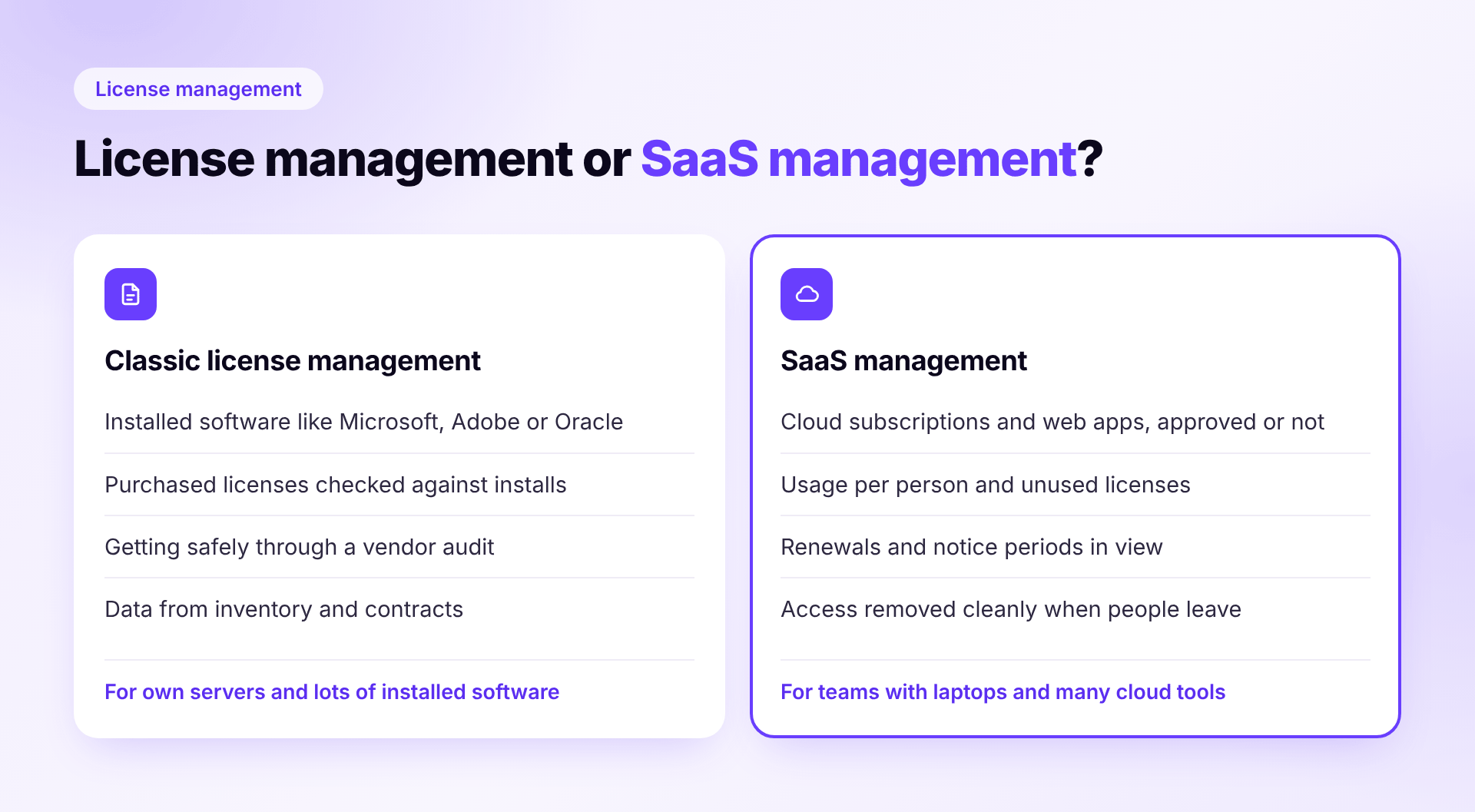
The two terms are often used interchangeably, but they mean different things. Classic license management, also called software asset management, counts installed software. How many Microsoft, Adobe or Oracle licenses did you buy and how many are installed? And would you pass a vendor audit?
SaaS management takes care of cloud subscriptions. Which web apps does your team use, even without approval? Who has access, when does each subscription renew and is everything revoked when someone leaves? For most SMBs with 30 to 150 employees, this is the question that matters. If you run your own servers and license a lot of installed software, you need the first kind.
Before you pick a tool, take a look at Microsoft 365, Google Workspace and your card statements. Our 15-minute license check shows how to do that without any new tool.
Which tool fits your team?
- Finance owns software spend and wants to pay for each tool with its own card? Cledara is a good fit.
- You use Google Workspace, Microsoft Entra or Okta and want an affordable start? Take a look at Corma.
- You work cloud-first and want devices, software and licenses in one tool, with or without an IT team? Sovaro is a good fit.
- You run your own servers, use a lot of installed software and face Microsoft or Oracle audits? LOGINventory or Matrix42 are worth a look.
The five tools at a glance
| Tool | Where the data comes from | Access when people leave | Price from |
|---|---|---|---|
| Cledara | virtual cards, browser extension (add-on) | requests to owners (add-on) | £75 per month (up to 20 apps) |
| Corma | identity provider (required), browser extension, optional agent | automatic (Pro plan) | free up to 10 users and 10 apps, otherwise on request |
| Sovaro | agent and browser extension, without SSO | tasks per tool (HR add-on) | €6.90 per person per month, 14-day free trial |
| LOGINventory | network scan, optional agent, Microsoft 365 and Intune; no web app detection | no workflow found (device return can be documented) | €8.60 per asset per year with license management (up to 249 assets), inventory only €6.50 |
| Matrix42 | data gateway, data sources, SaaS module | separate product (IGA) | on request |
SaaS management for cloud subscriptions and offboarding
These tools find out which web apps your team uses, who has which license and when contracts end. The main difference is the data source. Some read the identity provider such as Google Workspace or Microsoft Entra. Others use a browser extension, an agent on the laptop or payment data. That decides how much shadow IT they see. For a broader overview, see our comparison of SaaS management tools in Germany.
Cledara
A fit if Finance owns software spend and you want to pay for each tool with its own virtual card.
- Data a virtual card per app, manual entries and imports. A browser extension for usage and unapproved tools is only part of a paid add-on
- Strengths syncs with Xero and QuickBooks, NetSuite from Premium, reminder 15 days before renewal, SOC 2 Type II
- Limits no separate field for notice periods found, offboarding only as requests to owners in an add-on, no DATEV integration listed, no German interface found, prices in pounds
- Price Basic £75 per month for up to 20 apps, Premium £200 for up to 75 apps, Pro from £500, 16% off with annual billing, add-ons £150 per month each
- Vendor Cledara Ltd, London, founded 2018
Sources Pricing · More details Sovaro vs. Cledara
Corma
A fit if you use Google Workspace, Microsoft Entra or Okta and want to manage licenses and access affordably in one tool.
- Data connecting the identity provider is required, plus a finance tool, a browser extension and an optional desktop agent
- Strengths automatic provisioning and deprovisioning on the Pro plan, even without an API, renewal reminders via Slack and email, more than 20 HR systems such as Personio and HiBob, ISO 27001, data in the EU
- Limits no use without an identity provider, prices from Essential not published, the optional AI invoice reader can send invoices to OpenAI or Mistral, no German app interface found
- Price free for up to 10 users and 10 apps, Essential and Pro on request
- Vendor Corma SAS, Paris
Sources Pricing · More details Sovaro vs. Corma
Sovaro
A fit if you work cloud-first and want to keep devices, software and licenses in one tool, with or without an IT team.
- Data an agent for Mac, Windows and Linux plus a browser extension, no SSO needed. The extension does not read page content or keystrokes
- Strengths assigned licenses next to each person's last use, Sovaro AI recommends the right number of licenses before every renewal and flags duplicate tools, a tool admin and billing owner per app, license requests via Slack. With the Finance add-on, invoices come in from Gmail and Outlook and the billing owner gets a reminder before every renewal. With the HR add-on, a departure creates tasks for every tool. Plus a built-in MDM for laptops, a German interface and data in the EU
- Limits access is revoked through tasks, not automatically, Sovaro does not cancel subscriptions, company cards such as Moss, Pleo and Qonto are coming soon, no certification such as ISO 27001 or SOC 2, no license balance for server or core licenses
- Price IT base €6.90 per person per month excl. VAT, HR add-on plus €2.90, Finance add-on plus €4.90, both add-ons €12.50 instead of €14.70, 14-day free trial without payment details, cancel monthly
- Vendor Sovaro GmbH, Munich, founded 2026
Classic license management from Germany
These vendors come from classic software asset management. They detect installed software on the company network, match it against purchased licenses and produce reports for audits.
LOGINventory
A fit if you run your own Windows servers and need to license installed Microsoft, Adobe or Oracle software in an audit-proof way.
- Data network scan without installing anything on devices, an offline agent for remote work, Microsoft 365, Entra ID and Intune via APIs. You add web subscriptions yourself
- Strengths license balance per device, core, CPU, user and host, audit reports for Microsoft, Adobe, Autodesk and Oracle, German interface, data stays in your own database
- Limits on-premises only with Windows and SQL Server, no detection of web apps in use, no offboarding workflow found
- Price up to 249 assets €6.50 per asset per year for inventory or €8.60 with license management, excl. VAT, free for up to 20 devices, 30-day trial
- Vendor Schmidt's LOGIN GmbH, Munich, founded 1987
Sources Pricing
Matrix42
A fit if you want to manage installed software and SaaS in a large service management suite, in the cloud or on your own servers.
- Data agentless data gateway on the network, extensions for Intune, Microsoft 365, Entra, Adobe, Azure and AWS. A separate module detects SaaS from SSO, invoices and audit logs
- Strengths maintained license rules, compliance for Oracle, SAP and IBM as add-ons, the SaaS module is developed and hosted in the EU
- Limits no public prices, many features are add-ons, offboarding only through the separate Matrix42 IGA product, Windows and SQL Server needed on your own servers
- Price on request, every product can be tested free for 30 days
- Vendor Matrix42 GmbH, Frankfurt, founded 1992, acquired the SaaS vendor Viio in 2025
Sources Pricing
What to look for in license management software
- Where does the data come from? A tool that only reads the identity provider sees only apps with SSO or a Google or Microsoft sign-in. If you do not have SSO for every app, this is the most important question.
- Notice period or just the renewal date? A reminder on renewal day comes too late. What counts is the last day you can still cancel. Our guide to SaaS contracts and notice periods explains how to track it.
- Revoked or just reported? Some tools revoke access automatically, others create tasks. Both work if it is clear who handles the task. Our guide to deprovisioning shows how.
- What does it really cost? Watch for minimum prices, annual contracts, add-ons and currency. Browser extensions or automatic offboarding are often only in higher plans.
- Works council and data protection. In Germany, tracking who uses which app can require works council approval under Section 87(1)(6) BetrVG. Involve the works council early and check data location and the data processing agreement.
Is a spreadsheet or a spend tool enough?
For ten subscriptions, a well-kept spreadsheet with price, owner, renewal date and notice period is often enough. It reaches its limits once people join and leave regularly or nobody knows which tools are actually used.
A spend tool such as Moss, Pleo or Spendesk shows what you pay and makes bookkeeping easier. It usually does not show who uses a tool or whether all access was revoked when someone left. The two complement each other.
Want to see which apps your team really uses? Sovaro shows apps, licenses and last use per person, even without SSO. Before every renewal, Sovaro AI recommends how many licenses you need. 14-day free trial without payment details, cancel monthly. Start free trial
FAQ
See Sovaro with your own data.
Connect Google Workspace or Microsoft Entra and see your devices, apps, and licenses in minutes.
14-day free trial, no payment details required. Cancel monthly.