
On this page
When an employee leaves, most companies reliably take care of the reference letter, final pay and handover. Laptops, subscriptions and accounts, on the other hand, often stay open for months without anyone noticing. That's rarely on purpose. There's simply no list that has everything on it, and no clear answer to who ticks off which item.
Here you get the offboarding process in four phases, made for startups, scaleups, agencies and SMBs where nobody works full-time on HR or IT. Including the obligations that apply in Germany. At the end you'll find the checklist as a template to download, as a PDF and as an Excel file. If you need it right away, jump to the template.
Key points
- Offboarding starts when notice is given and only ends after deregistration, the final payroll and canceling licenses that are no longer needed.
- The most important step is a complete inventory of the person's devices, tools, accounts, admin roles and company cards. Anything missing from it won't get returned or blocked later.
- Blocking the main account in Google Workspace or Microsoft Entra isn't enough. Access to tools with their own login has to be removed one by one, and admin roles have to be transferred beforehand.
- In Germany, the obligations include deregistration from social security within six weeks after employment ends, the reference letter, the final payroll and, on request, the electronic employment certificate.
What is offboarding?
Offboarding is the structured process a company uses to handle an employee's exit: from the resignation through handover and returns to the final payroll. It's the counterpart to onboarding and applies to every exit, whether resignation, dismissal, mutual termination, the end of a fixed-term contract or retirement.
Good offboarding achieves three things:
- Knowledge stays in the company. Projects, customers and files are handed over before the person is gone.
- Accounts, devices and costs are properly closed. No open account, no missing laptop, no license that quietly keeps running.
- Obligations are met. Deregistration, required certificates, the reference letter and the final payroll are done on time.
The technical part, meaning devices, accounts and licenses, is also called IT offboarding. Removing the access itself is known as deprovisioning.
Why offboarding often goes wrong in small companies
In startups, agencies and many SMBs, offboarding happens on the side: through the office manager, whoever handles HR or the founders directly. When it goes wrong, it's almost always for the same four reasons:
- Nobody owns the whole thing. Everyone does their part, but no one checks at the end whether everything is really done.
- Nobody knows all of the person's tools. Anyone who signed up for a survey tool, a design tool or an AI app on their own isn't on any list. Those accounts, typical shadow IT and shadow AI, simply stay open.
- Time is shorter than expected. With remaining vacation and overtime, the actual last working day is often weeks before the official exit date.
- Costs quietly keep running. Licenses, mobile contracts and company cards only get noticed when the next invoice arrives, and sometimes not even then.
Who does what?
In small teams, two or three people often share the work, sometimes one person does everything. What matters is that one person coordinates the process and signs it off at the end. Usually that's People, Office or one of the founders.
- People or Office: starts the process, records deadlines, takes care of the reference letter, deregistration, required certificates and the exit interview.
- Team lead: plans the handover of tasks, projects and customers and informs the team.
- IT (whoever handles IT on the side at your company): laptop, the central account in Google Workspace or Microsoft 365, blocking and resetting.
- Tool owner: the person who manages a tool like Slack, Notion, HubSpot or Figma. They remove access there and release the license or pass it on to the successor.
- Finance or accounting: company card, open expenses, license costs and the final payroll with your payroll provider or accountant.
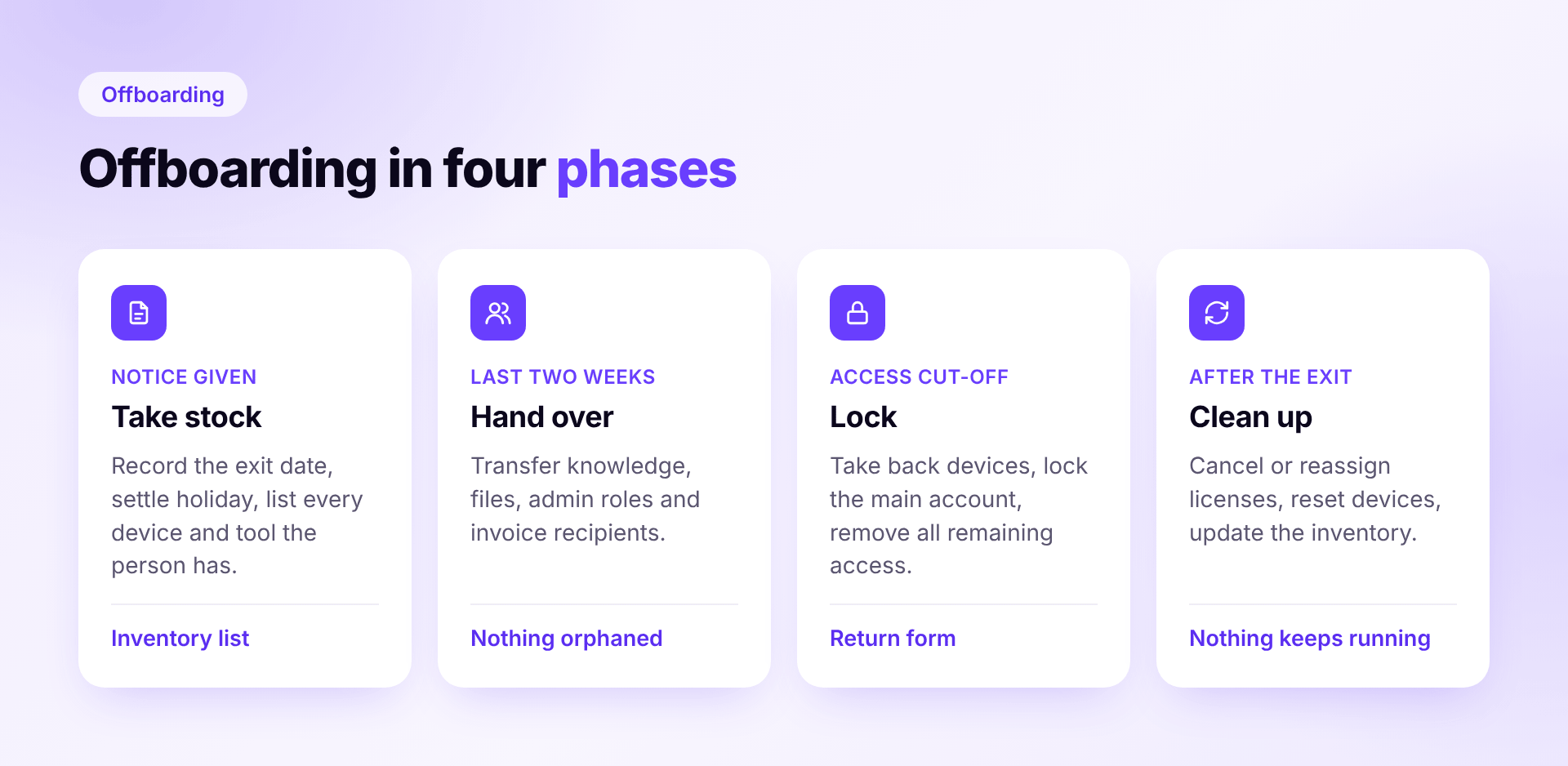
The offboarding checklist in four phases
Phase 1: As soon as notice is given
Now is the time to take stock. Everything you collect here, you'll need in the coming weeks.
- Confirm receipt of the notice, record the leaving date and the last working day
- Clarify remaining vacation and overtime: will they be taken or paid out? In Germany, vacation that can no longer be taken because of the exit has to be paid out.
- Record the exit in the HR tool and inform the team lead, the coordinator and Finance
- Check the employment contract for special terms, such as a non-compete or repayment of training costs
- Check employee equity if there's a VSOP or ESOP: what has vested by the exit date, and does a good or bad leaver rule apply?
- Create an inventory: laptop and accessories, all tools and accounts, admin roles, company card, keys and contracts such as the mobile contract
- Set up a handover plan: open tasks, projects, customers and who takes over what
- Decide when and how customers and partners learn about the change
The inventory is the most important step of the whole checklist. Anything missing here won't get returned or blocked later either.
Phase 2: In the last two weeks
Now it's about the handover. The person is still there and can answer questions, so make use of it.
- Hand over knowledge: documentation, handover meetings, open items
- Transfer files and ownership: files in Google Drive or OneDrive, shared folders, recurring calendar events and automations that run through the person's account
- Transfer admin roles and billing contacts. If the person is an admin or the billing contact of a tool, someone else has to take over beforehand. Otherwise invoices go nowhere or nobody can manage the license anymore.
- Check accounts in the person's name: move domains, social media accounts, app store accounts or subscriptions paid with a private card over to the company
- Hand over client access. Especially at agencies, the person often has access to client systems, such as ad accounts, analytics or the CMS. Switch this access to the successor and have the client remove the person.
- Check automations and API keys tied to the person and move them to a team or system account. Otherwise an integration silently breaks after the account is blocked.
- Change shared passwords the person knew
- Plan licenses: which go to the successor, which get canceled? Check the notice periods of the subscriptions.
- Schedule the device return, and arrange shipping for remote employees
- Hold the exit interview
- Agree with the person how their mailbox will be handled, and have them delete private content beforehand
- Prepare the reference letter
Phase 3: On access cut-off day
Usually that's the last working day, sometimes earlier, for example during garden leave. Set the time with a date and hour, so everyone knows when what happens. The BSI's IT-Grundschutz also calls for access to be removed in a structured way when someone leaves; more on that in our guide to BSI requirements for devices and access.
- Take back devices and accessories with a return record: device, serial number, condition, date, signature
- Take back keys and access cards, including the one for the coworking space
- Block the company card, whether at the bank or in the spend management tool
- Block the main account in Google Workspace or Microsoft Entra, end active sessions, remove app passwords and devices registered for two-factor sign-in
- Remove access outside the central login one by one. Blocking the main account only stops sign-ins via single sign-on, not accounts with their own password.
- Remove VPN, cloud and developer access, such as GitHub or AWS
- Turn on an out-of-office reply
- Remove the person from groups, mailing lists and chat channels
- Say a proper goodbye. How someone leaves is what they tell others about.
Phase 4: After the exit
The exit date isn't the end. Some obligations only come afterwards, and this is where most costs keep running unnoticed.
- Cancel or reassign licenses and reduce the number of seats before the next renewal
- Reset and wipe devices, then reissue or retire them and update the inventory. Send leased devices back or reassign them to the next person.
- Cancel or transfer the mobile contract and phone number
- Keep the business emails you're required to retain, then delete the mailbox after the agreed period
- Deregister from social security with the next payroll run. In Germany, this has to happen within six weeks after employment ends.
- Issue the employment certificate on request. In Germany, the Arbeitsbescheinigung is required when the former employee or the employment agency asks for it. Since 2023 it's submitted only electronically via the BEA procedure, usually straight from your payroll software.
- Issue a vacation certificate and run the final payroll, including payout of remaining vacation
- Hand over the reference letter
- Settle open expenses and company card statements
- Finally: go through the checklist, record open items and close it with a date and name
Special cases that often get forgotten
Dismissal without notice or garden leave. Here the order is reversed: access is blocked before or while the person finds out. Handover and returns come afterwards.
Remote employees. Send a shipping box with a prepaid label and set a deadline. If the device doesn't come back and it's enrolled in an MDM, you can lock and wipe it remotely as soon as it's back online. For the full picture on managing company laptops, from purchase to return, see our separate guide.
Freelancers and working students. Startups and agencies in particular work with many of them, often with the same access as permanent staff. Yet they rarely appear on an offboarding list. The IT items apply to them just the same. In Germany, working students also need to be deregistered from social security.
Internal moves. Not an exit, but still a case for the list: anyone who changes teams needs new access and should lose old access. Otherwise permissions pile up over the years that nobody needs anymore. The principle behind this is called Joiner Mover Leaver.
What can happen to the email mailbox
The mailbox is where most people are unsure, and rightly so. Business emails belong to the company, but a mailbox always contains personal data of the person and their contacts too. Under German law, the key question is whether private use of the mailbox was allowed. If it was, the options for accessing it are much narrower.
This pragmatic approach works well:
- Set the rule in advance, ideally in your IT policy or the employment contract: how long does the mailbox stay, who may access it, what happens afterwards?
- Have private content deleted before the exit and get the person's consent for how the mailbox will be handled
- Out-of-office reply instead of permanent forwarding: a note that the person is no longer with the company, plus a contact. Forwarding only for a limited time and by agreement.
- Keep what you must, then delete. Some business emails are subject to legal retention requirements, such as commercial correspondence. Keep those specifically, then delete the mailbox. Agree on a defined process for who may access what, and when.
Because the details depend on the individual case, it's worth agreeing on the rule once with your data protection officer. After that, it applies to every exit.
The most common mistakes
- Only blocking the main account. Tools with their own login stay open.
- Deleting the account right away. Files disappear, and automations running through the account break. Transfer first, then delete.
- Forgetting admin roles. If the person was the only admin of a tool, nobody can reach the settings afterwards.
- Removing access but not canceling the seat. The access is gone, the cost stays.
- Device returned but not reset. The previous user's data ends up with the next employee.
- No record. Anyone who later asks when a device came back or an account was blocked gets no answer.
Offboarding checklist template
So you don't have to start from scratch, the complete checklist is available to download, no sign-up needed. It includes Germany-specific HR requirements.
- Offboarding checklist as PDF to fill in on screen or print. Mark items that don't apply to you as "N/A". Best downloaded and opened in the free Adobe Acrobat Reader, so N/A rows are struck through too.
- Offboarding checklist as Excel to work on your computer: enter the exit details at the top, and due dates and progress are calculated automatically
Set items that never apply to you to "N/A" once and save that as your own template. After that, simply make a copy for every exit.
How Sovaro helps with offboarding
For context: we build Sovaro, a platform for devices, software and licenses. So here's how it looks with Sovaro.
With the HR add-on, as soon as an exit is recorded in Personio, Google Workspace or Microsoft Entra, Sovaro starts the process. All known devices and tools of the person land on a return list, including software someone signed up for on their own. Tasks go directly to the responsible tool owners, and every step is documented. Access is deliberately not blocked automatically; you decide when.
Try Sovaro for free: 14-day free trial, no payment details required. Cancel monthly.
Frequently asked questions about offboarding
See Sovaro with your own data.
Connect Google Workspace or Microsoft Entra and see your devices, apps, and licenses in minutes.
14-day free trial, no payment details required. Cancel monthly.