
On this page
On their first day, many new hires still don't have a laptop, accounts or access. That's rarely anyone's bad intent. Usually nobody started early enough and it wasn't clear who was responsible for what, so the new person spends day one sorting out equipment instead of getting to know the job, and that impression sticks.
Here you get the onboarding process in four phases, made for startups, scaleups, agencies and SMBs where nobody works full-time on HR or IT. Including the obligations that apply in Germany. At the end you'll find the checklist as a template to download, as a PDF and as an Excel file. If you need it right away, jump to the template.
Key points
- Onboarding starts right after the contract is signed. Two to four weeks of lead time are ideal so the laptop, accounts and access are ready on day one.
- The process has four phases, namely preparation after signing, setup in the week before the start, the first working day and the ramp-up until the end of probation.
- One person coordinates the whole process, while the team lead, IT, tool owners and Finance handle their parts. Access is granted based on the role, not copied from a colleague.
- In Germany, the obligations include the written statement of employment terms on day one, the occupational safety briefing before work begins and registration with social security within six weeks of the start.
What is onboarding?
Onboarding is the structured process a company uses to hire, equip and train new employees: from signing the contract through the first working day to the end of probation. It's the counterpart to offboarding.
Good onboarding achieves three things:
- The person can work from day one. Laptop, accounts and access are ready before they walk through the door.
- They settle into the team. They know what's expected of them, who to ask and how you work.
- Obligations are met. Registration, the written statement of employment terms and briefings are done on time.
The technical part, meaning devices, accounts and licenses, is also called IT onboarding.
Why onboarding often goes wrong in small companies
In startups, agencies and many SMBs, onboarding happens on the side: through the office manager, whoever handles HR or the founders directly. When it stumbles, it's almost always for the same four reasons:
- Started too late. The contract was signed weeks ago, but the laptop only gets ordered in the week before the start. With delivery, setup and shipping, that often isn't enough.
- Nobody knows which tools the role needs. So the person either gets too little and waits, or simply the same permissions as the colleague next door, including admin roles they'll never need.
- Access is handed out on request. Passwords get shared in chat, accounts are created with a private Gmail address, licenses are booked on the company card without Finance knowing.
- The plan ends after day one. The first day is fully scheduled, from week two onboarding runs on autopilot, and nobody really knows what the person should be able to do after a month.
Who does what?
In small teams, two or three people often share the work, sometimes one person does everything. What matters is that one person coordinates the process and signs it off at the end. Usually that's People, Office or one of the founders.
- People or Office: starts the process, collects personal data, takes care of the contract, registration, workplace and the first day.
- Team lead: defines which tools and permissions the role needs, plans the onboarding and holds the feedback conversations.
- IT (whoever handles IT on the side at your company): laptop, the central account in Google Workspace or Microsoft 365, setup and security.
- Tool owner: the person who manages a tool like Slack, Notion, HubSpot or Figma. They create access there with the right permissions.
- Finance or accounting: approves new licenses, sets up a company card if needed and registers the person with your payroll provider or accountant.
How to organize IT as a whole without an IT department is covered in a separate guide.
The onboarding checklist in four phases
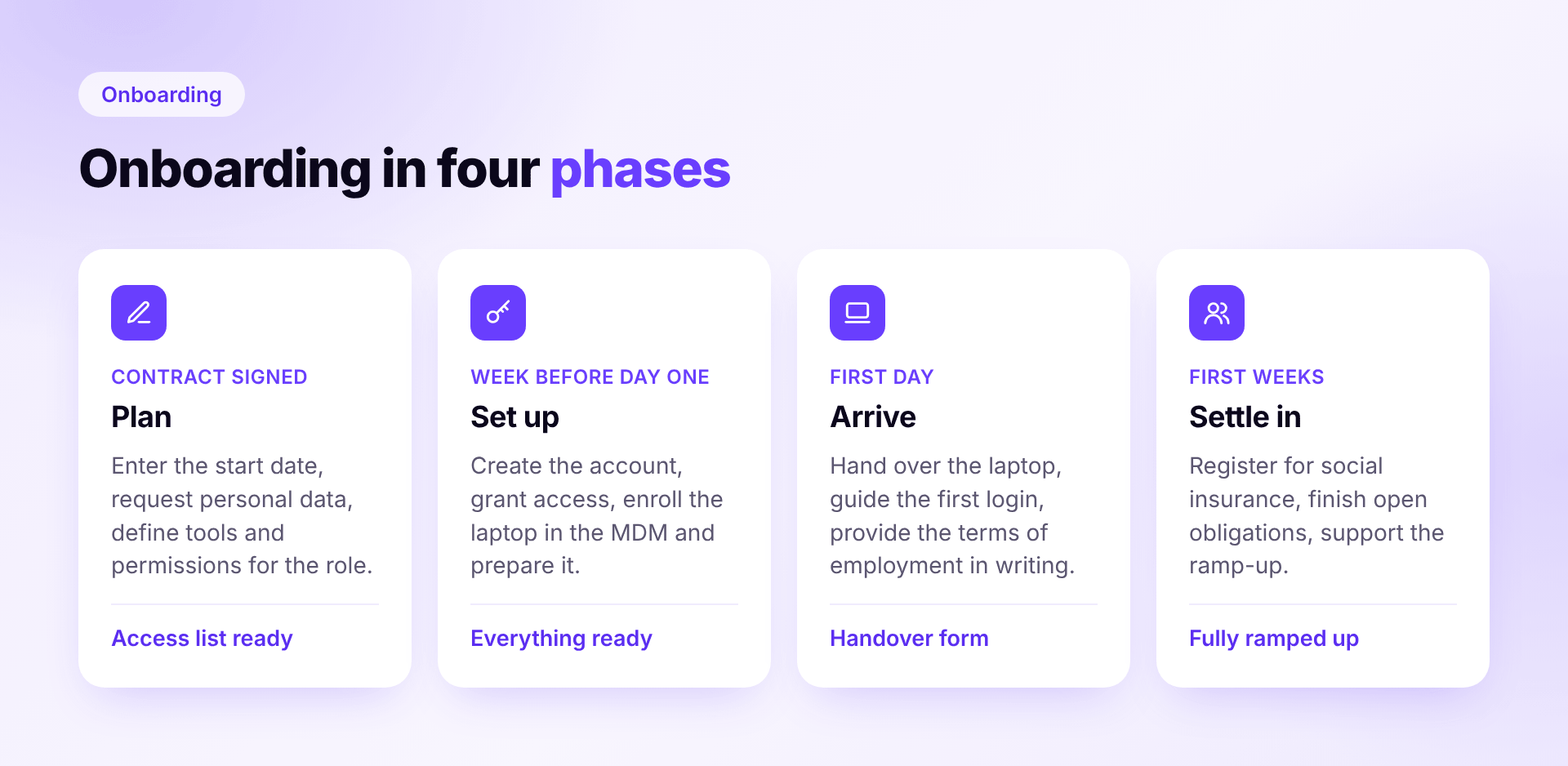
Phase 1: As soon as the contract is signed
This is when you have the most time, and you'll need it. Two to four weeks before the start is ideal.
- Record start date, role and team lead in the HR tool and inform IT, the team lead and Finance
- Request personal data, ideally with a personnel questionnaire: tax ID, social security number, health insurer, bank details, contact details
- For international hires, check whether the person may work in Germany. Citizens of the EU, the EEA and Switzerland generally can; otherwise check the residence permit with work authorization and keep a copy.
- Check whether your industry requires an immediate registration (Sofortmeldung), for example construction, hospitality, building cleaning or logistics. If so, it has to be filed at the latest when work begins.
- Order the laptop and accessories now, not in the week before the start. Or reserve and reset an existing device.
- Define which tools and permissions the role needs. Only as much as necessary, not a copy of a colleague's permissions.
- Check licenses: is there a free seat, or does Finance need to approve a new license?
- Choose a buddy, a fixed contact person for the first weeks who isn't the team lead
- Set up an onboarding plan for the first weeks: goals, meetings, who explains what
- Define a first task the person will own independently in the first weeks
- Sort out the workplace: desk, keys and access card, a coworking spot if needed
The list of tools and permissions deserves the most care. Whatever is missing here is missing on day one, and whatever is too much has to be cleaned up later.
Phase 2: In the week before the start
Now it's time to set things up. The goal is that nothing needs to be ordered or created on day one. For the full picture on managing company laptops, from purchase to return, see our separate guide.
- Create the account in Google Workspace or Microsoft Entra with a company email address
- Create access in the tools with the defined permissions. Where possible via the company sign-in (single sign-on), not with a separate password per tool.
- Add the person to groups, mailing lists and chat channels and put the most important meetings in the calendar
- Set up the laptop: enroll it in your MDM, with encryption and updates active and software installed. Then sign in once and test it.
- Prepare accessories: monitor, headset, mouse, keyboard, adapters
- For remote hires, arrange shipping so the package arrives by the Friday before the start at the latest
- Request a company card if the role needs one
- Send a welcome message: when and where it starts, who will meet them, what to bring
- Let the team know who's joining and when
Phase 3: On the first day
Today is less about technology and more about arriving. If everything is prepared, there's more time to get to know each other.
- Hand over the laptop and accessories with a handover record: device, serial number, condition, date, signature
- Guide the first sign-in: change the password, set up two-factor sign-in and a password manager
- Hand over keys and access card
- Written statement of employment terms: in Germany, the names of the parties, pay and working hours must be provided in writing or text form by today at the latest. If it's all in the signed employment contract, you're covered.
- Occupational safety briefing, which German law requires before work begins, in the office and for remote work too
- Data protection and IT policy: have the confidentiality agreement signed and explain how to handle company devices and data
- A tour, introductions to the team and lunch together with the buddy or team
- Go through the onboarding plan so the person knows what's happening in the coming weeks
Phase 4: In the first weeks
The first day is done, onboarding isn't. Some obligations only come now, and the actual ramp-up begins.
- In the first week, go through the most important workflows, contacts and decision paths together
- Register with social security with the first payroll run, within six weeks of the start at the latest. This usually happens directly in the payroll software or via your accountant.
- Have the tax data (ELStAM) retrieved via the payroll software
- Provide the remaining terms of employment if they're not in the contract: for example the length of probation and the rules for overtime by the seventh calendar day, vacation and notice periods within one month
- Adjust access: what's still missing, and what was granted just in case and isn't needed?
- Check that the laptop and accessories are assigned to the right person in your inventory
- Short feedback conversation after the first week
- After about 30 days, review together: what already works independently, and where is support still missing?
- Probation review: schedule it well before probation ends, not in the last week
- Finally: go through the checklist, record open items and close it with a date and name
Special cases that often get forgotten
Remote employees. Everything has to arrive before the start, there's no handover in person. The easiest option is a laptop that sets itself up when first switched on: via Apple Business or Windows Autopilot, it lands in your MDM automatically without anyone touching it first. This requires the device to be registered there in advance and assigned to your MDM, usually done automatically when you buy from an authorized reseller. Have the handover record confirmed digitally.
Working students and mini-jobbers. The IT items apply to them just the same, often with fewer tools. In Germany, mini-jobbers are registered with the Minijob-Zentrale, not with a health insurer.
Freelancers. Startups and agencies in particular work with many of them, often with the same access as permanent staff. Grant their access for a limited time from the start and note an end date. That way, they don't slip through at offboarding.
Internal moves. Anyone who changes teams needs new access and should lose old access. Otherwise permissions pile up over the years that nobody needs anymore. The principle behind this is called Joiner Mover Leaver.
Immediate registration. In some German industries, such as construction, hospitality, building cleaning or logistics, you have to register new employees at the latest when work begins. This Sofortmeldung doesn't replace the regular registration. It doesn't apply to most startups and agencies.
The most common mistakes
- Ordering the laptop too late. The classic. Order in the week before the start, and you'll improvise on day one.
- Copying permissions. "Just give her what Max has" sounds practical, but hands out admin roles and tools nobody needs.
- Accounts with a private email address. They're hard to transfer or block later and don't show up on any list at offboarding.
- Sharing passwords in chat. Once shared, the password is no longer with just one person.
- Licenses without Finance. New seats get booked without anyone checking whether one is still free.
- No plan after day one. The start is perfectly organized, the second week not at all.
Onboarding checklist template
So you don't have to start from scratch, the complete checklist is available to download, no sign-up needed. It includes Germany-specific HR requirements.
- Onboarding checklist as PDF to fill in on screen or print. Mark items that don't apply to you as "N/A". Best downloaded and opened in the free Adobe Acrobat Reader, so N/A rows are struck through too.
- Onboarding checklist as Excel to work on your computer: enter the start details at the top, and due dates and progress are calculated automatically
Set items that never apply to you to "N/A" once and save that as your own template. After that, simply make a copy for every new hire.
How Sovaro helps with onboarding
For context: we build Sovaro, a platform for devices, software and licenses. So here's how it looks with Sovaro.
With the HR add-on, as soon as a new person is created in Personio, Google Workspace or Microsoft Entra, Sovaro starts the process. HR, IT, the team lead and tool owners get their tasks with due dates, and access requests go straight to the responsible tool owner. The laptop is enrolled in the MDM in one step via a setup link. That way you always see what's still missing for day one.
Try Sovaro for free: 14-day free trial, no payment details required. Cancel monthly.
Frequently asked questions about onboarding
See Sovaro with your own data.
Connect Google Workspace or Microsoft Entra and see your devices, apps, and licenses in minutes.
14-day free trial, no payment details required. Cancel monthly.